What happens when my subscription expires?
If you had an old prepaid subscription, you’ll lose access to SparkChess Premium Live upon expiration and you need to purchase a new one.
The new recurring subscriptions are more convenient – they are renewed automatically each month/year as long as you don’t cancel.
What are the Premium Live subscription statuses and what do they mean?
When you create a SparkChess Premium Live subscription, you can manage it from your Premium Live account.
On each subscription you can see its status badge, which can be one of the following:
Active – congratulations, your subscription is paid until its next due date and you can freely access SparkChess services.
Canceled – you’ve canceled this subscription. You should see a “Resubscribe” button, should you want to reactivate it.
Past Due – the payment failed on due date. Our payment processor is retrying the payment, but this state usually indicates an issue with your card – maybe it’s expired, or there are insufficient funds available on it (for debit cards).
Pending – this is what may be confusing people. This status indicates that the subscription is schedule to come in effect at a later date. This can happen if you create a subscription while another one is still in effect. For example, on May 1st, you create a monthy subscription. One week in, you decide you prefer an annual subscription because it’s actually significantly less expensive. So you cancel the monthly subscription and create an annual one. But the canceled monthly subscription is still good for another three weeks, until May 31st, so the new annual subscription won’t kick in until May 31st and will remain in Pending state until then.
I can’t log in to Premium Live. What should I check?
There are several issues that might prevent a successful login.
Most frequently, this is due to an incorrect username or password. Start by asking for a password reset via the “Forgotten password?” link on the login screen. Enter your email and send. If you don’t receive an email with the password reset link in a few minutes, the email address is wrong. Contact us if you don’t remember the correct email. We’ve encountered cases with mistyped emails during purchase. If you do receive the email, change the password and try to log in again with the new one.
Very rarely, if after login you see a blank screen and possibly an error message at the top, i.e. “Your account is not properly set up”, it means that there was an error during the purchase that left your account in an inconsistent state – you need to contact us.
How do I reset or recover my Premium Live password?
To change your Premium Live account password, first log in to Premium Live and then click/tap on the downward arrow button at the top of the screen to open the Control Panel. From the control panel, click on the Password button. A window will pop up. Fill in the fields: first the existing password and then the new one, repeating it in the next field, for verification. Click/tap on Change Password button and you’re done!
To reset your Premium Live account password if you forgot it, on the login screen simply click on the “Forgotten password?” link and enter the email address of your account. You will receive an email with a password reset link. Click on it and a page will open in the browser, allowing you to enter and confirm the new email without having to provide the old one.
How can I cancel my SparkChess Premium Live subscription?
While we certainly hope you’ll enjoy SparkChess for many years, rest assured that you can cancel your subscription at any time, quickly and painlessly.
If you have a prepaid subscription, there’s nothing to cancel. After its expiration, you just won’t be able to log in anymore.
If you have a new, recurring subscription, you can manage it from your Premium Live account. Log in, open the control panel from the button at the top of the screen and click on Manage Subscription.
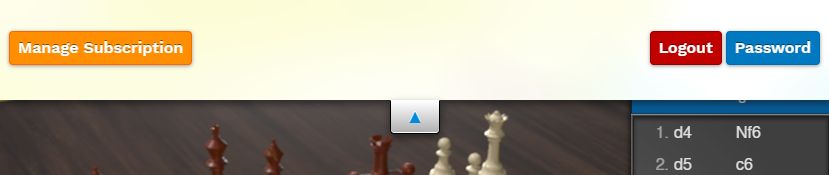
A list of subscriptions will be shown.
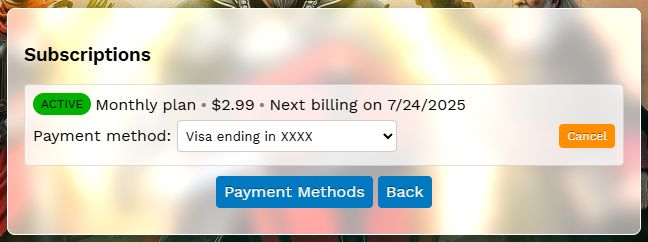
Click on the Cancel button on the current active subscription, confirm and your subscription will be canceled immediately, but you’ll still have access until the end of the subscription period.
How do I install SparkChess on Mac OS?
On Macs, SparkChess doesn’t need a special installer. There is no DMG or PKG file. When the download completes, Mac OS automatically decompresses the SparkChess zip file so all you need to do is to drag it from the Downloads folder to the desktop. Click here for a video.
My antivirus blocks SparkChess – why?
SparkChess does not contain any form of malware, spyware, adware or anything harmful. It doesn’t interact with the system beyond loading & saving games and accessing the internet in multiplayer; the installer doesn’t do anything else besides copying files. Still, some overzealous antiviruses may very rarely flag SparkChess and move it to quarantine. (Sometimes, antiviruses manage to actually label themselves as viruses.)
SparkChess was briefly flagged by Norton Antivirus as ‘WS.Reputation1‘, which basically means a file not commonly downloaded (new release – duh!). We worked with Symantec and whitelisted it but the process has to be repeated for every release. You should keep your virus definitions up-to-date so you don’t get false-positives.
If you are unsure about SparkChess for Windows, you can use the free VirusTotal.com service to upload and scan the installer. They scan with 70 different antivirus and antimalware programs.
If Norton Antivirus quarantined your download, please follow these instructions to restore it.
I purchased SparkChess but I still see the free version when I play
You’re probably launching the free version by mistake. Don’t worry, it happens.
Let’s review the possibilities:
- if you purchased SparkChess for PC or Mac, you no longer need to play the game in your browser. You must locate the downloaded game and install it on your computer. Use CTRL+J / CMD+J from your browser to see the Download History and look for a file containing the word “sparkchess”, e.g.
sparkchess20setup.exeon PC orsparkchess20.zipon Mac. - If you subscribed to Premium Live, you no longer need to access www.sparkchess.com – instead you must open the premium site at premium.sparkchess.com to sign in and play.