Is SparkChess a downloadable product or a subscription service?
When it was introduced in 2008, SparkChess Pro was just a downloadable product for Windows and Mac.
Over the years, we discovered (the hard way), just how difficult maintaining such a product is: executables need to be signed (and code-signing certificates are costly), some stupid antiviruses block the downloads and we had to contact them and submit samples, users can’t find the downloaded files, upgrades are difficult, and so on.
We started a transition, first to prepaid subscriptions in 2014 and then to recurring ones in 2025. We believe they bring more value to our players, since with the same subscription they can play on any device, but we still maintain the download options, mostly for existing customers.
The game looks wrong – different from screenshots
If SparkChess looks nothing like it should, the most likely explanation in our experience is because of a High Contrast theme.
If SparkChess looks similar to the screenshot below
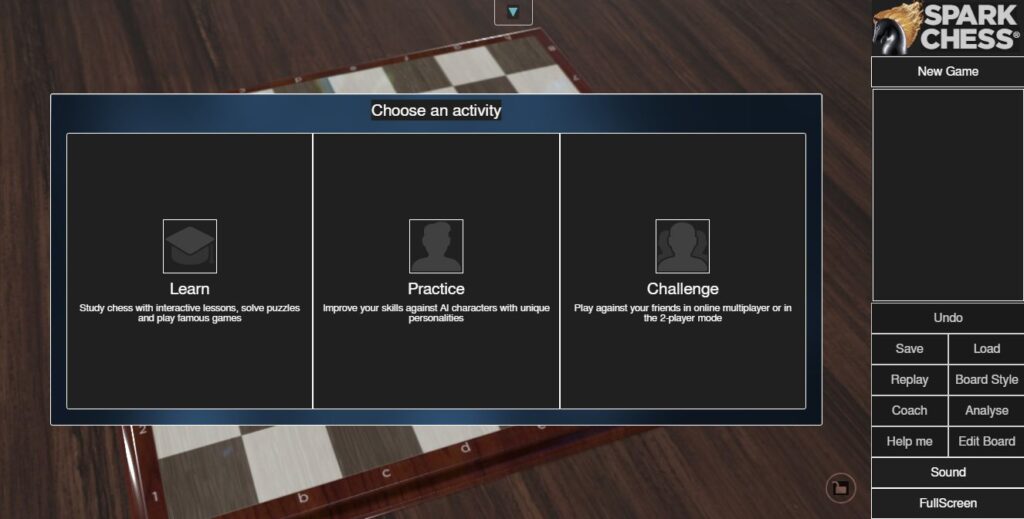
then you need to disable the high contrast theme for SparkChess to look “normal”. In Windows, press WIN+S to open windows search and search for “contrast theme”, open the settings and disable the theme.
Other causes
If a high-contrast theme is not the issue, make sure you’re using a reasonably recent browser. Anything released within the last five years should be fine. Old Internet Explorer or first-gen iPads won’t work.
Lastly, make sure it’s not a caching or extension issue. Try clearing the cache or open SparkChess in an Incognito/Private window.
How can I cancel my SparkChess Premium Live subscription?
While we certainly hope you’ll enjoy SparkChess for many years, rest assured that you can cancel your subscription at any time, quickly and painlessly.
If you have a prepaid subscription, there’s nothing to cancel. After its expiration, you just won’t be able to log in anymore.
If you have a new, recurring subscription, you can manage it from your Premium Live account. Log in, open the control panel from the button at the top of the screen and click on Manage Subscription.
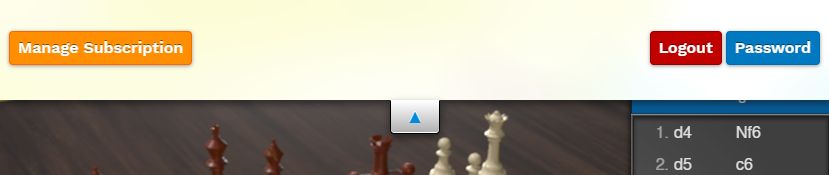
A list of subscriptions will be shown.
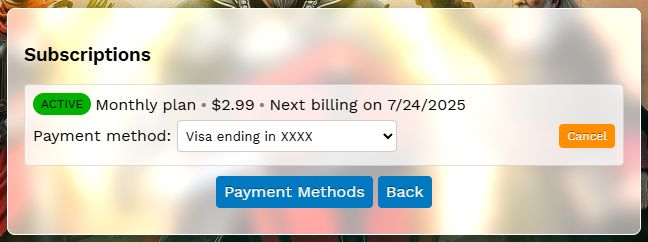
Click on the Cancel button on the current active subscription, confirm and your subscription will be canceled immediately, but you’ll still have access until the end of the subscription period.
How do the timers work in SparkChess?
In single-player, player timers go up. They are informative only and players won’t lose a game for thinking too long on a move.
In multiplayer, there are two timer modes, depending on the play area:
- a simple mode – time/move, in which the player must make a move within one minute or whatever the lobby setting is. This is the default for most public lobbies.
- proper time control – game time + bonus per move, in which a total time is allocated per game and then a bonus is given per move. A time control of “10/5” means 10 minutes per game, with a 5 second bonus after each move. The time control may be set up by teams.
We use this setup because we think it’s more beginner-friendly. Your feedback is welcome and we’ll adjust the timing if needed.
What are offline challenges?
“Offline Challenge” is the name we chose for correspondence chess. You can read a detailed how-to on correspondence chess.
How do I play correspondence chess in SparkChess?
Use the new Offline Challenge mode.
How do I delete my multiplayer account?
The fastest and most secure way to delete your multiplayer account is from SparkChess. Select Challenge → Multiplayer, log in, select a playing area, click Account → Delete and enter your password for confirmation before clicking the Delete button.
The accounts are deleted immediately. If the deleted account was owning a team, the team is deleted as well. Leaderboards may take up to one hour to update.
Deleted accounts are generally not recoverable. If you deleted your account by mistake and are a premium player, we may be able to recreate your account, so please contact us.
The game history is not deleted.
Does SparkChess multiplayer support crossplay?
Yes. We don’t rely on any closed platform for multiplayer or leaderboards and we own our entire tech stack. As such, users can play with each other regardless of the platform they’re on – PC users can play with Mac users, Android devices can play with iPhones, and so on.